
Remini AI Photo Enhancer App is a popular AI-powered photo editing tool that helps improve old, blurry, and low-quality pictures. It uses artificial intelligence to sharpen details, reduce blur, enhance colors, and make photos look clearer and more detailed.
With Remini, users can enhance their photos with just a few simple steps. The app is designed for both beginners and experienced users, making it easy to restore old memories, improve portraits, and enhance everyday pictures. In this guide, we will cover the main features of Remini, how to use it, its free and premium options, and the safest ways to download the app in 2026.
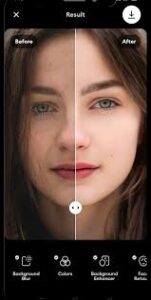
Features of Remini AI Photo Enhancer App
Remini AI Photo Enhancer App offers several AI-powered tools that can improve the quality and appearance of photos. Whether you want to restore an old family picture or make a blurry image clearer, Remini provides simple tools for different editing needs.
1. AI Photo Enhancement
Remini can improve blurry and low-quality photos by enhancing details and making images look sharper and clearer. This feature is useful for photos that have lost quality because of poor focus or low resolution.
2. Old Photo Restoration
The app can help restore old, faded, or damaged photographs. It can improve details, contrast, and colors, making vintage photos look cleaner and more presentable.
3. Image Upscaling
Remini can enlarge low-resolution images while improving their overall clarity. This is particularly useful when you want to view, share, or print a small photo at a larger size.
4. Color Enhancement
Remini can automatically improve colors, lighting, and overall image appearance. Some tools can also add color to suitable black-and-white photographs.
5. Face and Portrait Enhancement
For portrait photos, Remini can enhance facial details and improve image clarity. This makes it useful for profile pictures, selfies, and personal photographs.
6. Background Enhancement
The app can improve details in backgrounds and other parts of an image. As a result, landscapes and everyday photos can appear sharper and more detailed.
7. Video Enhancement
Remini also offers AI-based video enhancement features on supported plans. Depending on the current version and subscription, users may be able to improve the quality and resolution of videos.

How to Use Remini AI Photo Enhancer
Using Remini is simple, even if you are new to AI photo editing. Follow these steps to enhance a blurry or low-quality photo:
- Open the Remini app on your Android or iOS device.
- Tap the Enhance option on the main screen.
- Select the photo you want to improve from your gallery.
- Follow the on-screen instructions and start the enhancement process.
- Wait for the AI to process your image. Processing time may vary depending on the feature and image.
- Compare the original and enhanced photo to check the result.
- If you are satisfied, save or share the enhanced image.
For better results, choose a photo with visible details and reasonable lighting. Keep in mind that some features may require ads, credits, or a premium subscription depending on the current version of the app.

Download Remini AI Photo Enhancer App
Remini AI Photo Enhancer App is available for Android and iOS devices. For safety, download the app only from trusted and official app stores. This helps protect your device and personal data from modified or potentially harmful APK files.
Android
Android users can search for Remini – AI Photo Enhancer on the Google Play Store. Check the developer information before installing the app and make sure you are downloading the genuine application.
iPhone and iPad
iPhone and iPad users can download Remini through the official Apple App Store. Search for Remini – AI Photo Enhancer and verify the app details before installing it.
Avoid Unofficial Mod APKs
Be careful with websites offering Remini Mod APK, cracked versions, or unlocked premium features. These modified files are not official versions and may create security or privacy risks. For a safer experience, use the official version available through Google Play or the Apple App Store.
FAQs
Is Remini AI Photo Enhancer free?
Remini can be downloaded for free, but some features and usage limits may depend on the current app version and subscription plan. Premium features may require a paid subscription.
How do I make a blurry photo clear with Remini?
Open Remini, select the Enhance option, choose the photo you want to improve, and follow the on-screen instructions. The AI will process the image and show you the enhanced result.
Is Remini available for Android and iPhone?
Yes. Remini is available for both Android and iOS devices. For safety, download it through the official Google Play Store or Apple App Store.
Does Remini enhance old photos?
Yes. Remini includes AI-based tools designed to improve old, blurry, faded, and low-quality photos. Results can vary depending on the quality and condition of the original image.
Does Remini enhance videos?
Remini also offers video enhancement features on supported versions and plans. Availability and access may vary depending on your subscription and the current app version.
Is Remini Mod APK safe?
Unofficial Mod APK files can create security and privacy risks because they are modified by third parties. It is safer to use the genuine Remini app from the official Google Play Store or Apple App Store.
Last Point About Remini
Remini AI Photo Enhancer App is a useful option for people who want to improve old, blurry, or low-quality photos with the help of AI. Its simple interface makes photo enhancement accessible to beginners, while features such as sharpening, restoration, color improvement, portrait enhancement, and upscaling provide different ways to improve images.
However, the quality of the final result can depend on the original photo and the feature being used. Some advanced tools may also require a premium plan. For a safer experience, always download Remini from an official app store and avoid unofficial or modified APK files.
Overall, Remini is worth considering if you want a quick and simple way to enhance your photos using AI in 2026.